
 FA+
FA+ Shop
Shop
2625
Views
Views
67
Favorites
Favorites
Category
All / Comics
Species Unspecified / Any
Size 902 x 700
File Size 220.3 kB
Report this content
More from redsaber


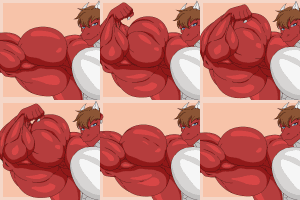
Here's another project that has been in the back burner for some time now, so sorry to all those who were looking forward to seeing more of "Free Lunch" colored.
Orginally drawn by rabid ©
Characters belong to brenderlin and
  BeckyCascane
Original black & white verison http://www.furaffinity.net/view/2943884/
Side Note othellodrake and brenderlin made a comment about how Brenna's shorts clatched to much with her body. So I decide to go back and make some changes.
Orginally drawn by
 rabid ©
Characters belong to
 brenderlin and
  BeckyCascane
Original black & white verison http://www.furaffinity.net/view/2943884/
Side Note
 othellodrake and brenderlin made a comment about how Brenna's shorts clatched to much with her body. So I decide to go back and make some changes.
Category All / Comics
Species Unspecified / Any
Size 902 x 700px
File Size 220.3 kB


There's Auto Contrast and Brightness on any photoshop:
1. Go to the top of the screen on any photoshop and look for "Image" then it will show a few things you can do.
2. After that stay on "Image" then go to "Adjustments" which will show you much things you can use.
3. Stay on "Adjustments" then go to Brightness/Contrast, then another window will show you how much Bright and Contrast you will need.
I'm myself learned to use Photoshop CS2 and CS4 since 2years ago...
1. Go to the top of the screen on any photoshop and look for "Image" then it will show a few things you can do.
2. After that stay on "Image" then go to "Adjustments" which will show you much things you can use.
3. Stay on "Adjustments" then go to Brightness/Contrast, then another window will show you how much Bright and Contrast you will need.
I'm myself learned to use Photoshop CS2 and CS4 since 2years ago...



Comments