
 FA+
FA+ Shop
Shop
1451
Views
Views
34
Favorites
Favorites
Category
Artwork (Digital) / General Furry Art
Species Exotic (Other)
Size 772 x 1000
File Size 534.1 kB
Report this content
★
More from Iggi




Personal: Mirromy
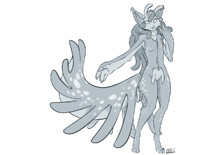
The finished in Sculptris Mirromy Body. In time I will likely take this over to a modeling program to tweak and make a usable lower resolution mesh and texture. All around this probably took between 6 and 8 hours to do. Didn't exactly time myself, more of an estimate.
Mirromy © Iggi
If you like Mirromy, I have an account dedicated tot hem here mirromy
Mirromy © Iggi
If you like Mirromy, I have an account dedicated tot hem here
 mirromy
Category Artwork (Digital) / General Furry Art
Species Exotic (Other)
Size 772 x 1000px
File Size 534.1 kB

Every little bit I go and do a reduce to keep it as low poly as i can, granted it means a bit of cleanup at the end, but yeah. I had it crash a lot too, so I save every 5 minutes. It may help that my PC is reasonably powerful, though I am unsure how much it aids.

I'm running a pc with good graphics and 8gb ram so I'm pretty sure it isn't my computer. How do you go about keeping stuff low poly? X3 I'm unfamiliar with the term I guess. Haha, I just picked up the program 'cause I saw the awesome work you did...it's fun when it works X3
Turn on wireframe mode (button on the left) and it show you how dense (how many faces or facets) your creation (mesh) is. I'd use reduce selected if the wireframe is thick enough to obscure the base color of the mesh in at least 50% of the model if you are partially zoomed in. Otherwise, take the reduce brush and stroke it along on areas that are heavy with polygon faces or areas where more than 5 faces join to create a star shape. (as it makes weird points on the flow) I'd check it about every 10 minutes of modeling.
Then after the base mesh is finished, reduce it then go in with the smooth brush and clean up any edges that may have gotten a bit whacked from the continuous use of reduce poly tool. Make sure to save every 5 minutes or so, alternating on save one and 2 just in case.
Then after the base mesh is finished, reduce it then go in with the smooth brush and clean up any edges that may have gotten a bit whacked from the continuous use of reduce poly tool. Make sure to save every 5 minutes or so, alternating on save one and 2 just in case.


It just works for me, leave it on default settings of 512 when I click paint. But the age of the laptop doesn't matter if it isn't powerful enough to run the program well. You may wish to make sure your polys are low before hand, as it might be too heavy to do all at once.
500k is very very high. I honestly don't know where to check it... but I would reduce the mesh that when the character fits fully on your screen in wireframe mode it isn't so dense that you can't see the base color in at least half of it. All objects would total the poly count as the program still has to deal with all of them in the scene.

Comments