
 FA+
FA+ Shop
Shop
1527
Views
Views
67
Favorites
Favorites
Category
All / Muscle
Species Western Dragon
Size 1000 x 1075
File Size 456.1 kB
Report this content
More from HerculesRazor


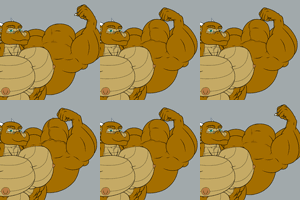
So this is my new drawing style! And with it I present to you quite possibly the largest I've ever drawn myself. Stats haven't changed, still sitting at 65 tons of solid muscle under a bronze and tan hide. Powerhouse is an understatement as always.
Now before anyone asks, this IS the full image, I wanted something a little more focused, and my face shape needs a little tweaking (nothing will really change though) before it works with the new style.
The thing with this new drawing style is, there's no sketch, not base lines, nothing. The image took shape entirely from my mind to a finished line work with no steps between. Every line you see here was stroked in one quick flick of the stylus, and trimmed with the eraser where needed.
Once you get used to it, things move quickly, and you can get the shapes you want very easily.
Now before anyone asks, this IS the full image, I wanted something a little more focused, and my face shape needs a little tweaking (nothing will really change though) before it works with the new style.
The thing with this new drawing style is, there's no sketch, not base lines, nothing. The image took shape entirely from my mind to a finished line work with no steps between. Every line you see here was stroked in one quick flick of the stylus, and trimmed with the eraser where needed.
Once you get used to it, things move quickly, and you can get the shapes you want very easily.
Category All / Muscle
Species Western Dragon
Size 1000 x 1075px
File Size 456.1 kB




Wow, you're getting really good. The shading looks very smooth and natural. What kind of technique do you use for shading? I'm guessing a rather large and/or smooth brush, but do you use a second layer to shade darker and then layer the color, or do you use lighter/darker colors of each section to shade?
What I do is flat fill all the base colours of the character at The brightest values I expect to have. Then I make a copy of this layer and fill it flat black, sitting over the colours but under the lines. I set this layer to between 35 and 45 percent opacity. This layer is then "lit" by using the eraser in SAI set to full soft edge, 20-30% density, and 100% min size.
I do this once for all the lightest bits, changing the size of the brush where needed, but the brush mostly stays at 250px for the body, and I work at 5000x5000 or a non square canvas of that general size.
Once I've done the lightest bits I make a copy of the "shade" layer, which darkens the shadows but leaves the brightest bits still the same. So it deepens the contrast. Then I use the eraser on this new layer to light the mid tones and round out the shadows where needed.
The last step is to use the blur tool to smooth out any shading that looks uneven and rough. After that I can play with the opacity of the two shade layers to get the contrast I want.
It's not a terrific way to shade, it's a bit messy at times. But I find it's working well, and as I develop it I've managed to clean it up more.
I do this once for all the lightest bits, changing the size of the brush where needed, but the brush mostly stays at 250px for the body, and I work at 5000x5000 or a non square canvas of that general size.
Once I've done the lightest bits I make a copy of the "shade" layer, which darkens the shadows but leaves the brightest bits still the same. So it deepens the contrast. Then I use the eraser on this new layer to light the mid tones and round out the shadows where needed.
The last step is to use the blur tool to smooth out any shading that looks uneven and rough. After that I can play with the opacity of the two shade layers to get the contrast I want.
It's not a terrific way to shade, it's a bit messy at times. But I find it's working well, and as I develop it I've managed to clean it up more.

Comments