
 FA+
FA+ Shop
Shop
5574
Views
Views
221
Favorites
Favorites
Category
All / All
Species Leopard
Size 1280 x 768
File Size 533.7 kB
Report this content
★
More from zorryn



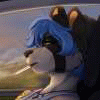
Well yeah, fooling around with C4D's new stereoscopic mode.
You'll need anaglyph goggles for this one.
I still have no clue of what Vivon is afraid of.. the audience? Spacejellyfish? Taxrefund? I dunno... :[
You'll need anaglyph goggles for this one.
I still have no clue of what Vivon is afraid of.. the audience? Spacejellyfish? Taxrefund? I dunno... :[
Category All / All
Species Leopard
Size 1280 x 768px
File Size 533.7 kB


















Oh those from most of the movie theaters won't do it, ya gotta have the Red/blue ones.
Ya can readily get em' from http://gopro.com/camera-accessories/3d-glasses/ and they cost bout $5.00 for a five pack of the paper and mylar lens type.
Ya can readily get em' from http://gopro.com/camera-accessories/3d-glasses/ and they cost bout $5.00 for a five pack of the paper and mylar lens type.














Simply amazing! I found quite a few 3D images on FA, but almost none have a full depth set up. You just see some sprites in front of others as if closer characters / objects are sheets of paper floating in front of your screen. This is the first furry image I see where depth is done properly, and it looks pretty mind-blowing and as real as it can get.




I got it to display on a 3D monitor using an nVidia shutter glasses kit and by using some software that can display anaglyph as page-flip sequences. Dl'd this, http://stereo.jpn.org/eng/stphmkr/help/index.htm, then File > Open Stereo Image > click the color anaglyph radio button > Open; then the Stereo drop-down menu > Page-Flip Setup > picked the renderer that mine uses > picked my screen size; then hit F8. The effort is worth it for this image alone, although I also know how to view any other anaglyphs now, especially ones on FA. :) I haven't figured out how to display animations using that same software, though. Great expression and pose, the 3D modeling and design is as awesome as it is in your other works, and nice depth of course. The colors look less saturated with anaglyph, so maybe I'll try using Blender or something to separate the channels of the swf frames and transcode them back into a swf. It's possible that the file could be opened in Blender and rendered out side-by-side in a single container, but that wouldn't necessarily have the same materials that makes Cinema4D renders look better than average Blender renders.


Comments