
 FA+
FA+ Shop
Shop
3519
Views
Views
148
Favorites
Favorites
Category
Artwork (Digital) / General Furry Art
Species Wolf
Size 1280 x 800
File Size 281.5 kB
Report this content
More from tsaiwolf


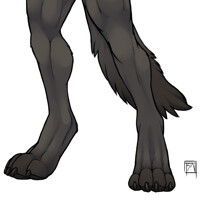


I've been working on a simple bust model for a few days, and I decided to try my hand again at some fur. This is from Shave and a Haircut, and I think it has turned out pretty good, compared to some of my previous attempts at fur. It's still not perfect, but I figured I'd post it anyway since I don't have much 3D art up here on FA.
The character belongs to thundergrey. I have been trying to do some good models based off his character for quite a while now, so when I decided to just work on a bust, I figured I'd keep trying to work on his character.
The character belongs to
 thundergrey. I have been trying to do some good models based off his character for quite a while now, so when I decided to just work on a bust, I figured I'd keep trying to work on his character.
Category Artwork (Digital) / General Furry Art
Species Wolf
Size 1280 x 800px
File Size 281.5 kB







 Ssvanti



Yes I did, I'm not ever sure why maya has to add that one pixel outline to geometry there. This render took about 3.5 minutes, but I've been toying some more with render settings since yesterday and it looks like my final render time would be about 4.5 with some settings adjusted. I also have a displacement map for the character, but I haven't rendered it out yet with the displacement there, so that would probably add about another minute or so. It's hard to say.

Hrm. Odd. Mentalray in 3dsmax doesn't do such oddities 0-o So Maya screwed up the alpha-channel and added a one pixel border around everything?
You gave me reason to finish the rigging on my 3d demonguy today, btw xD Now I have a headache from all of that crap. Does Maya crash as much as Max does? I mean they're both Autodesk software after all x]
You gave me reason to finish the rigging on my 3d demonguy today, btw xD Now I have a headache from all of that crap. Does Maya crash as much as Max does? I mean they're both Autodesk software after all x]
I dunno, it crashes sometimes, and Autodesk only recently bought out Maya from Alias/Wavefront. I've pretty much figured out how to work with it so that it doesn't crash as often though. I did find out that I think the weird pixel is actually a photoshop issue, as it composites correctly in After Effects.
Ah hm. I do prefer After Effects or Fusion over Photoshop for such things, too. It's somewhat a shame that Adobe never reworked the way it handles additional channels or pulls information out of them.. A bit too clumsy for my tastes. Though I am amazed when I see that people rely on just Photoshop to composite their final renders >_O Either they're crazy or I'm impatient @N@


It looks great, better then a lot of 3D fur effects I've seen.
However I think a lot of the "uncanny valley" that happens with 3D fur is because there's just too much detail that can be seen at once. Lighting plays a big part in this, and in natural lighting conditions many sections of an animal's fur and features will tend to smoothly blend in with itself to the eye. Typically only "stand out" features will be very noticable at most distances (such as the fur in the back of the head), sans a tuft or few strands of fur here and there.
It also looks almost "too" perfect. In the sense that the fur is all very uniform and even, which might be what is causing a lot of the above point.
The model itself looks great, and the fur in controlled sections does as well. I know a lot of this isn't something that can be helped much since I've yet to see fur rendering plugin that actually takes these things into account and isn't in the hands of Pixar (therefore very closed market), though I've not looked so who knows. And it's not a criticism of what you've done here (as it does look very good), more or less a rambling of thoughts on 3D fur effects as a whole.
However I think a lot of the "uncanny valley" that happens with 3D fur is because there's just too much detail that can be seen at once. Lighting plays a big part in this, and in natural lighting conditions many sections of an animal's fur and features will tend to smoothly blend in with itself to the eye. Typically only "stand out" features will be very noticable at most distances (such as the fur in the back of the head), sans a tuft or few strands of fur here and there.
It also looks almost "too" perfect. In the sense that the fur is all very uniform and even, which might be what is causing a lot of the above point.
The model itself looks great, and the fur in controlled sections does as well. I know a lot of this isn't something that can be helped much since I've yet to see fur rendering plugin that actually takes these things into account and isn't in the hands of Pixar (therefore very closed market), though I've not looked so who knows. And it's not a criticism of what you've done here (as it does look very good), more or less a rambling of thoughts on 3D fur effects as a whole.


Holy cow and it is just like in your style. That is amazing. Congrats. If you have a tablet you might like sculptrix (spelling might be off) by pixel-logic it is free and it allows you to sculpt your 3D models and everything. I have zbrush which is the more expensive one by the same company.

Comments