
 FA+
FA+ Shop
Shop
1199
Views
Views
59
Favorites
Favorites
Category
Artwork (Digital) / Fantasy
Species Lion
Size 750 x 321
File Size 116.9 kB
Report this content
More from Stigmata



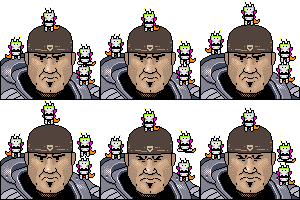
I have seven images in stereo. Here's one of the translations for you.
Adjust your focus until the images cross, and focus on the middle one.
Full-view makes this a bit hard, so I'd recommend scooting back from your screen.
Adjust your focus until the images cross, and focus on the middle one.
Full-view makes this a bit hard, so I'd recommend scooting back from your screen.
Category Artwork (Digital) / Fantasy
Species Lion
Size 750 x 321px
File Size 116.9 kB




The purpose of switching it is to make it easier to see--you can move your eyes a lot more when you cross them vs. when you 'look through' the image. This is one of those 'look-throughs', and if you swapped the L/R images and cross your eyes instead, you get the same image. It's just waaay easier that way.

I'm floored. I've always wanted to do a stereogram ever since I've seen the Tool album cover that's full of them. I'm a lazy fuck, and so it's rad to see someone attempting to do this. I was also drawn to the rendering, I love the marks. Just what sort of custom brushes or settings do you use, may I ask?


Tragelaphus did a tutorial: http://www.furaffinity.net/full/3757451/
However his finished image uses the cross-eyed view method rather than the parallel view method which is used here. See http://en.wikipedia.org/wiki/Stereo.....g_scenarios.29
However his finished image uses the cross-eyed view method rather than the parallel view method which is used here. See http://en.wikipedia.org/wiki/Stereo.....g_scenarios.29


I'm not sure how much this interests you, but I'd been planning to experiment with 3D in my later college work via a different technique than stereograms. By shifting back and forth between the left and right eye views at a decently fast framerate, a similar illusion of 3D can be accomplished. I actually took this work of yours and made it into a sort of proof-of-concept for my idea, to see if it would work for paintings.
http://i.imgur.com/4Vxdg.gif
The vibration sort of takes away from the intended tone of your painting, I think, and it's not as elegant as it appears in stereogram, but I find it to be a much easier way to allow people to see 3D images without straining their eyes (short of 3D glasses and the appropriate monitor, of course).
Either way, I'm very impressed with all this 3D work of yours!
http://i.imgur.com/4Vxdg.gif
The vibration sort of takes away from the intended tone of your painting, I think, and it's not as elegant as it appears in stereogram, but I find it to be a much easier way to allow people to see 3D images without straining their eyes (short of 3D glasses and the appropriate monitor, of course).
Either way, I'm very impressed with all this 3D work of yours!
Wanna know something funny? The same time you were making these one of my other friends had also made gifs of my images. I like that it's easier on the eyes, but it's a shame the stutter is so distracting. Thanks for taking the time to show me, at any rate.
Thanks for the compliment.
Thanks for the compliment.
I haven't seen many stereoscopes like this one that use the parallel view method rather than the cross-eyed view method. If you use the cross-eyed view method on this the depth is inverted (everything that should be concave appears convex and vice versa), maybe that's why matrixretoasted thought the images were in the wrong order. Very good job anyways
For whatever reason I assumed it was less stressful for most people to handle the parallel method. Looks like I may have been wrong! More than a few people have told me that my 3D was inverted, and I was confused about that for some time.
Thanks for the clarification.
Thanks for the clarification.
Well your picture inspired me, so I went and made my own far less imaginitive and original stereoscope: http://www.furaffinity.net/view/5648888/
I made it cross-eyed since I have so much trouble with the parallel view method.
I made it cross-eyed since I have so much trouble with the parallel view method.


While looking at the center of the stereoscopic pair, place your finger about halfway between you and the screen. If you converge your eyes to focus on your finger you will notice the images on the screen begin to overlap.
Adjust your finger's position until the images completely overlap. Because you are still focusing on your finger, the images on the screen will be blurred.
The trick is to remove your finger and allow yourself to focus on the screen without uncrossing your eyes. Done correctly, you will see three images on the screen. The center image will have depth and the two outer images will not.
Your brain translates the disparity between the images that have overlapped into the experience of depth.
Adjust your finger's position until the images completely overlap. Because you are still focusing on your finger, the images on the screen will be blurred.
The trick is to remove your finger and allow yourself to focus on the screen without uncrossing your eyes. Done correctly, you will see three images on the screen. The center image will have depth and the two outer images will not.
Your brain translates the disparity between the images that have overlapped into the experience of depth.


Comments