
 FA+
FA+ Shop
Shop
1312
Views
Views
15
Favorites
Favorites
Category
Artwork (Digital) / General Furry Art
Species Vulpine (Other)
Size 1280 x 500
File Size 767.4 kB
Report this content
★
More from Feralise


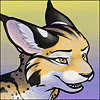
I am posting this because I spent 8 hours making this skin (not the shape, the shape belongs to  ) She has given me her full permission to post the mods I have made for her aventity-line avatars. <3
I have been learning how to make textures that can be used in Second Life.
I am working on my custom fursona appearance and this is what I have so far.
The head skin fit first try perfectly! The ears actually took more work and I had to learn how to make transparent textures with alpha layers and all that. X3
As I learn to wrap my brain around more texture techniques, I hope to set up a shop and actually start selling skins in SL. Huzzar! X3
 ) She has given me her full permission to post the mods I have made for her aventity-line avatars. <3
 I have been learning how to make textures that can be used in Second Life.
I am working on my custom fursona appearance and this is what I have so far.
The head skin fit first try perfectly! The ears actually took more work and I had to learn how to make transparent textures with alpha layers and all that. X3
As I learn to wrap my brain around more texture techniques, I hope to set up a shop and actually start selling skins in SL. Huzzar! X3
Category Artwork (Digital) / General Furry Art
Species Vulpine (Other)
Size 1280 x 500px
File Size 767.4 kB


Wow! Just really wow! You are definitely learning fast, darling! That looks so utterly amazing! I have been trying to do a little bit of modding on my avatars, but I can definitely never manage to make anything look as awesome as this!
*giggles and huggles*
I really believe that if you would get more into this and open a shop, you will be real successful! Yeh! I would definitely come to you!
*giggles and huggles*
I really believe that if you would get more into this and open a shop, you will be real successful! Yeh! I would definitely come to you!
There was a .psd file that a friend sent me that is used for making skins. But there are basic grids in SL that you can use to tell what goes where.
Honestly, I picked up things from all sorts of places. Google was my best friend, as were some friends already on SL. ^^;
Honestly, I picked up things from all sorts of places. Google was my best friend, as were some friends already on SL. ^^;
Ohh, actually all I did here was the skin/mod of the head. The head itself was made by as she owns her own line of furry avatars in SL.
She gave me her full permission to post my mod that was based off of the head she designed.
Personally, I'm learning how to sculpt in Blender bit by bit. It's got a HUGE learning curve, but I'd recommend if you're interested in sculpties, look up Blender.
It's free, and there's tons of helpful tutorial videos on how to get started and even more advanced stuff. It's wicked awesome. :D
as she owns her own line of furry avatars in SL.She gave me her full permission to post my mod that was based off of the head she designed.
Personally, I'm learning how to sculpt in Blender bit by bit. It's got a HUGE learning curve, but I'd recommend if you're interested in sculpties, look up Blender.
It's free, and there's tons of helpful tutorial videos on how to get started and even more advanced stuff. It's wicked awesome. :D

So far I follow exactly what you're saying. however I still wonder where you got the template to skin the head. I imagine you cannot download the sculpie to paint on in blender or the original texture to edit in photoshop, so how did you figure out where to put the eyes or the nose ect. Did you just guess? Did she give you a copy of the polygon map?
There's a place in SL called Ivory Tower Tutorial Island. If you go there, and go left of the big building, up a hill, you'll see a small little pavillion there.
In there, there are templates for skinning objects. They look like number grids mixed with different color boxes. You apply that grid (its a texture file) to any object and use it for reference when making the texture. In the notecard that you can get for how to texture objects, it should have a link to the 512x512 image on the internet. Use that as your base layer in w/e program you draw in.
It's not easy, at that point, it's alot of referring to how the grid fit on the head, and where you want markings/lines to go. Alot of trial and error here, for sure.
I hope this helps!
In there, there are templates for skinning objects. They look like number grids mixed with different color boxes. You apply that grid (its a texture file) to any object and use it for reference when making the texture. In the notecard that you can get for how to texture objects, it should have a link to the 512x512 image on the internet. Use that as your base layer in w/e program you draw in.
It's not easy, at that point, it's alot of referring to how the grid fit on the head, and where you want markings/lines to go. Alot of trial and error here, for sure.
I hope this helps!

Comments