
 FA+
FA+ Shop
Shop
616
Views
Views
17
Favorites
Favorites
Category
All / Fanart
Species Hyena
Size 1024 x 1024
File Size 1.11 MB
Report this content
More from KDNightstar


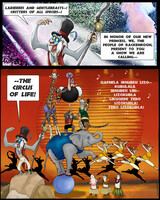


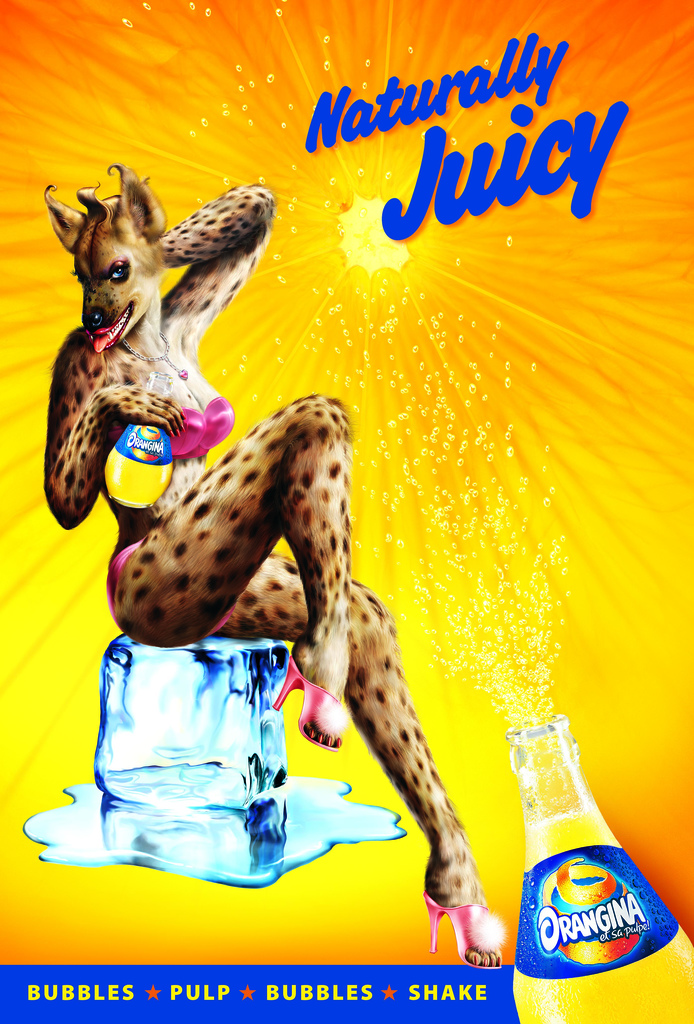
Remember the Oragina Hyena ad?
https://adsofbrands.net/images/comm.....68e1ad6d1c.jpg
Well, I couldn't resist...
https://adsofbrands.net/images/comm.....68e1ad6d1c.jpg
Well, I couldn't resist...
Category All / Fanart
Species Hyena
Size 1024 x 1024px
File Size 1.11 MB

When I visited Dinosaur Farm in South Pasadena, they had just gotten in a new shipment of figures from Papo. Among the contemporary zoo animals, they had a couple of huge spotted hyenas which made me wonder if hyenas are the size of Bull Mastiffs, or if these were the large hyenas that dominated the savannah like plains during the ice age. Because of my fondness for the strip, I was tempted to pick up a couple as drawing references because they were so nicely detailed and painted.
Been next to live ones at that Out of Africa Park, glad there was a fence... Been very close to a massive stuffed one, worked a few weeks for a Safari broker. Job thru Kelly Services. Place was full of game trophies. Had that thing glare at me while doing data entry and a Giraffe looking over my shoulder....
Sadly ads these days have to be boring and bland and safe, or the kind of ads that you can't even figure out what the heck they are even trying to promote as if the advertisers were on some kind of drugs.
How did you add the spots in these? I've been playing around in Hero Forge but I don't see these kind of color options.
How did you add the spots in these? I've been playing around in Hero Forge but I don't see these kind of color options.
Go to the Color drop-down, you'll see a Decals option. There are little pictograms of various places you can put decals--face, hair, clothing, etc. Some are just dirt or blood spatters, but under the Torso and Legs options you'll find various fur patterns and scars. For this one I selected the solid spots option, but for my regular hyenas I choose "Dapple."
The spots will appear red. You then go to the Paint option and choose a color and touch the brush to a spot to make them that color.
If a decal has two or three colors to it (red, yellow, orange) you can color each one differently, or hit all three to make it the same color.
If you look up at the top of the decal menu, you will see something like "Pattern A B C D E F G". You can make several decal choices by putting one on each layer--spots, muzzle color, eye make-up, scars, each on a different layer.
I hope this is useful.
There's also an adjuster on some decals to make the patterns larger or smaller, to rotate the patterns, or to raise them or move them around on the body.
The spots will appear red. You then go to the Paint option and choose a color and touch the brush to a spot to make them that color.
If a decal has two or three colors to it (red, yellow, orange) you can color each one differently, or hit all three to make it the same color.
If you look up at the top of the decal menu, you will see something like "Pattern A B C D E F G". You can make several decal choices by putting one on each layer--spots, muzzle color, eye make-up, scars, each on a different layer.
I hope this is useful.
There's also an adjuster on some decals to make the patterns larger or smaller, to rotate the patterns, or to raise them or move them around on the body.
Thanks I checked it out, also feeling a little silly about this now since that button was right there but I had ignored it thinking it was like the decal for the base and just putting the hero forge logo somewhere. >.>
I'll be playing around with this some more, it's stupid fun trying to recreate my characters or make new ones. =D
I'll be playing around with this some more, it's stupid fun trying to recreate my characters or make new ones. =D
Yeah, it's addictive! I like to challenge myself to see if I can create a decent facsimile of a character with what's available. I also use it to create posing models for getting perspectives right when I draw a tricky pose. Being able to put two characters on a base has been a Godsend. I used to pose each character, download a screen scot, then carefully cut away the background in Photoshop so I could combine the images. I used that several times during the duel scene between Kathy and Jinjur.
But once they ennabled two characters on a base, I recreated several of the vignettes.
I'm not so happy with the new facial expressions tool. It works great for the human characters, but it does weird things to the dog face base I use--giving it lips, for example. If you have older figures, save a copy before you try "updating" it, because you will NOT be able to go back to the legacy copy!
But once they ennabled two characters on a base, I recreated several of the vignettes.
I'm not so happy with the new facial expressions tool. It works great for the human characters, but it does weird things to the dog face base I use--giving it lips, for example. If you have older figures, save a copy before you try "updating" it, because you will NOT be able to go back to the legacy copy!

Yeah the facial features could use some fine tuning for anthro characters I've found, still the whole thing is pretty versatile even with some of the limitations the system has. Hopefully more will get added in the future.
Thanks for the warning with updates, I'll try to remember that.
Kinda want to make a scene of Fred meeting my eagle majordomo, Erena. though I don't recognise some of the parts, maybe some of them changed since then, like the hairstyles?
Oh yeah, I've managed to find some of these old Orangina ads on youtube, the hyena one was great, though also liked the rollerskating giraffe =p
Thanks for the warning with updates, I'll try to remember that.
Kinda want to make a scene of Fred meeting my eagle majordomo, Erena. though I don't recognise some of the parts, maybe some of them changed since then, like the hairstyles?
Oh yeah, I've managed to find some of these old Orangina ads on youtube, the hyena one was great, though also liked the rollerskating giraffe =p
I use the curly short hair morph for Fred, and the small round armless glasses. They added big owlish glasses recently, which also work, but with the smaller ones you can see some of his eyes.
You'll have to select the hyena ears and short brushy tail. I also use the "animal like torso" not the really furry torso, and the doglike legs. The head of course is the dog/wolf person head.
His hair color is the black leather color. His body color is Hermit Grey and his muzzle is Lone Beast Brown. You will have to select the muzzle marking decal. His nose is Snoot from the skin color menu. HIs eyes are green and his eyebrows are black. His ears are sauteed mushroom brown. His chest is lunch tray tan from the plastic menu. His nails are gunmetal from the metals menu. His teeth are fake snow from the plastic menu.
I use the Outlaw Shirt and the Noble Skirt with hakama pants for his uniform. The Hero Forge Red is the color for the tunic and IIRC tighy whitie for the pants.
You'll have to select the hyena ears and short brushy tail. I also use the "animal like torso" not the really furry torso, and the doglike legs. The head of course is the dog/wolf person head.
His hair color is the black leather color. His body color is Hermit Grey and his muzzle is Lone Beast Brown. You will have to select the muzzle marking decal. His nose is Snoot from the skin color menu. HIs eyes are green and his eyebrows are black. His ears are sauteed mushroom brown. His chest is lunch tray tan from the plastic menu. His nails are gunmetal from the metals menu. His teeth are fake snow from the plastic menu.
I use the Outlaw Shirt and the Noble Skirt with hakama pants for his uniform. The Hero Forge Red is the color for the tunic and IIRC tighy whitie for the pants.

Comments