
 FA+
FA+ Shop
Shop
2281
Views
Views
46
Favorites
Favorites
Category
Artwork (Digital) / Fat Furs
Species Rabbit / Hare
Size 568 x 460
File Size 63.4 kB
Report this content
More from Aldi


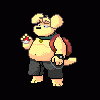
An artist, who asked to remain anonymous, surprised me with a gift and has created a character for MUGEN out of my bunny Flapper! However, I know nothing of MUGEN. I have downloaded the game, installed his character files and ran it. I don't know how to select a character. When I press enter or any other key, nothing happens. Thankfully, I'm able to admire his excellent work by letting it play in demo mode. He is so huggable!! He grows fatter at the beginning of each game!
See examples here:
http://www.youtube.com/watch?v=pG7wytOdu1E
http://www.youtube.com/watch?v=peY5rfZSqZ4
See examples here:
http://www.youtube.com/watch?v=pG7wytOdu1E
http://www.youtube.com/watch?v=peY5rfZSqZ4
Category Artwork (Digital) / Fat Furs
Species Rabbit / Hare
Size 568 x 460px
File Size 63.4 kB





that sounds weird. I can only wonder what the problem is at this point :S
I mean, I know I can tell you for the video you were trying to take a picture of that it isn't actually displayed on the "screen", it displays a shade of black that you can see the video on. Don't ask me why this is and don't ask me what it's called, because I wouldn't remember.
But.... yeah. Weird that it wouldn't work.
I mean, I know I can tell you for the video you were trying to take a picture of that it isn't actually displayed on the "screen", it displays a shade of black that you can see the video on. Don't ask me why this is and don't ask me what it's called, because I wouldn't remember.
But.... yeah. Weird that it wouldn't work.

Actually if I remember right, it's not black but hex #010010 or something like that, and if you play the video behind that screenshot, the screenshot is transparent and the video shows through! XD
If this happens to you, you just need to go to your display settings and turn off video acceleration (in Windows XP I remember there was a slider for the acceleration, it just needed to be turned down one notch I think, not entirely off.)
Lemme know if that helps =)
If this happens to you, you just need to go to your display settings and turn off video acceleration (in Windows XP I remember there was a slider for the acceleration, it just needed to be turned down one notch I think, not entirely off.)
Lemme know if that helps =)
Trust me, it's because of the way DirectX layers work, it captures the black overlay rather than the actual video. I've had the same thing happen to me in the past where it captures just the black stuff, and then I turned off video acceleration and it fixed it. *hugs back*
I'll give you all the steps to get there =)
Go to your display settings (right-click the desktop and go to Properties), then go to the Settings tab. Click the Advanced button and go to the Troubleshoot tab. I think it needs to be on the notch that says "Disable all DirectDraw and Direct3D acceleration." I think that's the setting but if that doesn't work, try "None" (the left-most one marked for disabling everything).
Hope that works for you! =) If not, I'm out of ideas. XD
Go to your display settings (right-click the desktop and go to Properties), then go to the Settings tab. Click the Advanced button and go to the Troubleshoot tab. I think it needs to be on the notch that says "Disable all DirectDraw and Direct3D acceleration." I think that's the setting but if that doesn't work, try "None" (the left-most one marked for disabling everything).
Hope that works for you! =) If not, I'm out of ideas. XD






Sorry, I still can't make anything happen. None of the keys will make a game start, nor entering in the "arcade" option, where I try to select a character, but nothing happens and I end up pressing "esc" (the only key that will let me leave) and then I'm back at the main menu.
I guess I'm just too clueless to figure it out.
I guess I'm just too clueless to figure it out.
MUGEN is joypad compatable off the bat, if you have one (it makes PC games a lot easier to screw with)
I'm just glad to see that people are still making goodies for MUGEN...most original characters are utter crap in the design department. btw, mugenizing a character involves a LOT of code typing, as does adding the character to the actuall playlist
if you have a link, I could use something new in my lineup.
I'm just glad to see that people are still making goodies for MUGEN...most original characters are utter crap in the design department. btw, mugenizing a character involves a LOT of code typing, as does adding the character to the actuall playlist
if you have a link, I could use something new in my lineup.




Comments