
 FA+
FA+ Shop
Shop
5723
Views
Views
54
Favorites
Favorites
Category
Artwork (Traditional) / Tutorials
Species Vulpine (Other)
Size 843 x 1085
File Size 411.6 kB
Report this content
More from The_Furry_Art_Academy


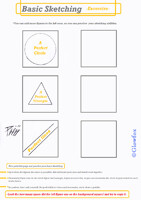

*Advanced 3D Perspective-Tutorial-*
...As seen in the previous tutorial, the most you play with the arrows, more camera angles you will find.
~this time we have a third refference point, using the previous tutorial for the base, this time with the (A) point on the "sky".
*If you want your character or the figure on the draw to look huge for the camera angle. just add the (A) point more closer to the "ground"(the grey shaded zone).
*In this perspective tutorial , everything is based to the (A) point, so please read what is writted on the picture.
Tutorial by
 glowfox
Category Artwork (Traditional) / Tutorials
Species Vulpine (Other)
Size 843 x 1085px
File Size 411.6 kB

well, lets say that you are on the entrance of some building and you decide to look up to the sky, you will notice that the building take some perspective from your angle. if you play with the (A) point showed on the picture here, you will find new angles of perspective honey :3 give it a try , and if its not clearly for you still, I can ask my friend to translate what i really want to say (i dont speak too much english as you can see)


Comments