
 FA+
FA+ Shop
Shop
1981
Views
Views
24
Favorites
Favorites
Category
Screenshots / Fantasy
Species Exotic (Other)
Size 1280 x 749
File Size 222.6 kB
Report this content
★
More from VinVulpis


Listed in Folders

Game Engine PALETTE SWAPPING: Why So Difficult!?
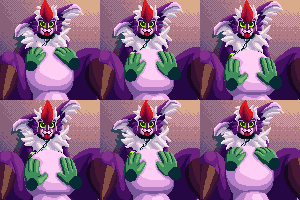
This is mainly meant to act as a journal post with a supporting image.
Why do modern game engines have no way of editing palettes? Palette swapping's been around for a long time, but this isn't a thing accounted for. MUGEN does it simply. You mean to tell me it's gotta be super complicated in real engines?
At least in Unity and Godot there is no built-in way of handling this, and that's a huge problem for me as this is a NEEDED function for my game. I apparently have to write my own palette swapper if I'm gonna use one of these engines. And I'm like... just figuring the basics out still.
I've seen a bunch of shit about needing a mask for every frame? Are you shittin me!? 250+ frames per character and enemy type... no. Just no. Apparently there is some sort of way using a base sprite of the entity that can make the engine do the color function for the rest of the assets, but I'm a long way off from figuring that out.... so WE'LL SEE I GUESS.
I've pretty much been leaning on going with Godot, but I'm hoping I can figure out a way to do this efficiently, otherwise I'm gonna have to look at another engine. This is important. I really figured something like this would be a no-brainer in any engine.
ANUS. Okay? Anus.
EDIT:
So I think I have a bit of an understanding how the shader method works, but the idea of layering up double assets feels icky, ontop of needing to make an extra set of hungreds of assets for the shader to apply colors to.
There are ways from what I'm told me make the engine load images specifically to gather color data, but it involves rewriting how the engine loads images, using one image as palette info, and then recognizing each color on all assets in the group and automatically makes the shade change those colors, which I doubt I'm gonna figure out any time soon. So, I'm probably gonna be stuck going with the mask route. Will see. I guess since I'm stuck doing this with most engine choices, I guess I'll move forward keeping this in mind.
Why do modern game engines have no way of editing palettes? Palette swapping's been around for a long time, but this isn't a thing accounted for. MUGEN does it simply. You mean to tell me it's gotta be super complicated in real engines?
At least in Unity and Godot there is no built-in way of handling this, and that's a huge problem for me as this is a NEEDED function for my game. I apparently have to write my own palette swapper if I'm gonna use one of these engines. And I'm like... just figuring the basics out still.
I've seen a bunch of shit about needing a mask for every frame? Are you shittin me!? 250+ frames per character and enemy type... no. Just no. Apparently there is some sort of way using a base sprite of the entity that can make the engine do the color function for the rest of the assets, but I'm a long way off from figuring that out.... so WE'LL SEE I GUESS.
I've pretty much been leaning on going with Godot, but I'm hoping I can figure out a way to do this efficiently, otherwise I'm gonna have to look at another engine. This is important. I really figured something like this would be a no-brainer in any engine.
ANUS. Okay? Anus.
EDIT:
So I think I have a bit of an understanding how the shader method works, but the idea of layering up double assets feels icky, ontop of needing to make an extra set of hungreds of assets for the shader to apply colors to.
There are ways from what I'm told me make the engine load images specifically to gather color data, but it involves rewriting how the engine loads images, using one image as palette info, and then recognizing each color on all assets in the group and automatically makes the shade change those colors, which I doubt I'm gonna figure out any time soon. So, I'm probably gonna be stuck going with the mask route. Will see. I guess since I'm stuck doing this with most engine choices, I guess I'll move forward keeping this in mind.
Category Screenshots / Fantasy
Species Exotic (Other)
Size 1280 x 749px
File Size 222.6 kB

Problem is, my characters also have somthing around 24 to 36 colors on average. (each color having 3 shades. so it'd be a very busy issue with the shaders to mask each and every character asset like this. It seems extremely clunky. If there is a way I can get the engine to identify colors on my assets, that would e much more ideal. From what I understand, I'd need to make a black image and in the RGB, nudge each color up by one. 0,0,0 to lets say 36,36,36. by that point too, wont the shader also start having issues with lighter values, by not showing the color correctly? that's why they use dark colors, yeh? What's to stop me from just using the same exact image in the shader, and just grabbing the RGB values from that, to run through the shader if it can do solid color replacements? I mean, I guess I CAN export every asset with this separate palette of 0 to 36 type stuff, provided Fireworks doesn't choke on rendering colors so close in value together for hundreds of frames.
I just find it really silly that it can apparently edit a sprite ONTOP of the character, but not the character itself. All my WAT.
It's funny too because I went through the effort in MUGEN to neatly organised the color tables for every asset so .act files could easily swap them. From what I'm told, Godot just throws away the color table information. OR I have to recode how it reads the files. x_x
I suppose I can take the existing color tables and just use Fighter factory to alter the palette and re-export everything out from that.
I just find it really silly that it can apparently edit a sprite ONTOP of the character, but not the character itself. All my WAT.
It's funny too because I went through the effort in MUGEN to neatly organised the color tables for every asset so .act files could easily swap them. From what I'm told, Godot just throws away the color table information. OR I have to recode how it reads the files. x_x
I suppose I can take the existing color tables and just use Fighter factory to alter the palette and re-export everything out from that.


Old games used to do it easily because each color was just an index, referencing a palette stored elsewhere in the memory. So instead of RGB values it'd be much cheaper 0-15 numbers for each pixel.
Since we've moved from that being the standard to RGBA being the standard it's harder to achieve this effect, although you can get the same effect using shaders instead. To put it basically, have two texture samplers in the fragment shaders; the original sprite and another image with just the palette. You can get the color values (or just the Red value) in the sampled original sprite, and use them for coordinate values for the second texture.
Since we've moved from that being the standard to RGBA being the standard it's harder to achieve this effect, although you can get the same effect using shaders instead. To put it basically, have two texture samplers in the fragment shaders; the original sprite and another image with just the palette. You can get the color values (or just the Red value) in the sampled original sprite, and use them for coordinate values for the second texture.

Yeah, and I have to make EVERY frame a second time for the shader to work with, right? If there is some way to just get the engine to see each color from one base palette image, then have the shade automatically shade each frame without needing to layer up a mask for hundreds of frames, that'd be ideal.
My assets are indexed though, so I'm just surprised that these systems don't have something to work with indexed color tables by default.
My assets are indexed though, so I'm just surprised that these systems don't have something to work with indexed color tables by default.
Kinda sorta. You could import the sprites into Aseprite and use the color swap tool to make it more "palette-friendly" so to speak, so the color gets whiter the further down the palette it's supposed to be. Yes, you'd have to replace each color semi-manually, aseprite can apply the color replacement to every frame in the file at the same time, making it a lot easier.
Even if they are indexed in the tool you're using, it most likely doesn't save it when you export it to another file type.
Even if they are indexed in the tool you're using, it most likely doesn't save it when you export it to another file type.
I use Fireworks as my pixel animation software. I use Fighter Factory's palette editor to make my .act files more orderly.
Thing is, since Fireworks is a bit silly when it comes to rendering some palettes, I actually make sure each color value is well separated and I don't always use the character's true colors in the raw palettes.
Like, look at my current avatar (it's adjusted to "natural lighting") but would the actual assets like my avatar work? or do I have to gray-scale them?
My characters on average have around 24 to 36 colors. (each hue having 3 shades) If I have to just change the raw image colors, that's not that big of a deal really.
I'm not sure with you mean by "the further down the palette." In my color tables, my colors are neatly organized in sets of three on the bottom corner of the color table, like this:
https://www.dropbox.com/s/57n9ys50h.....table.png?dl=0
Thing is, since Fireworks is a bit silly when it comes to rendering some palettes, I actually make sure each color value is well separated and I don't always use the character's true colors in the raw palettes.
Like, look at my current avatar (it's adjusted to "natural lighting") but would the actual assets like my avatar work? or do I have to gray-scale them?
My characters on average have around 24 to 36 colors. (each hue having 3 shades) If I have to just change the raw image colors, that's not that big of a deal really.
I'm not sure with you mean by "the further down the palette." In my color tables, my colors are neatly organized in sets of three on the bottom corner of the color table, like this:
https://www.dropbox.com/s/57n9ys50h.....table.png?dl=0
By "further down" I was referencing my earlier comment, on how the shader uses the color value from the original sprite to see where the pixel it should use on the palette is. So like, if a pixel on the original sprite is 76% red, it'd use the color 76% to the right on the palette image instead. The blue and green values in the original sprite wouldn't matter, since it only looks at the red.
You'd just have to change the raw image colors to take that rule into account easily. You CAN use the unedited sprite as it appears in your avatar, but that would be harder to manage, since it'd point to different coordinates.
This is just one way of doing a palette swap shader, but it's the one I'm most accustomed with, and pretty flexible once you get used to it. I have the shader working in my own project, but that's in gamemaker, so I don't know how it'd differ from how godot interacts with GLSL.
Edit: Agh whoops I didn't realize I wasn't replying to the chain above me.
You'd just have to change the raw image colors to take that rule into account easily. You CAN use the unedited sprite as it appears in your avatar, but that would be harder to manage, since it'd point to different coordinates.
This is just one way of doing a palette swap shader, but it's the one I'm most accustomed with, and pretty flexible once you get used to it. I have the shader working in my own project, but that's in gamemaker, so I don't know how it'd differ from how godot interacts with GLSL.
Edit: Agh whoops I didn't realize I wasn't replying to the chain above me.
The shader in Godot from what i gather functions the same way. Its reads gray or red.
So basically, i should probably just make my sprites gray and then maybe reapply the color with the shader maybe, if I'm understanding it right. I if i have to make it, that i can just layer the gray asset onto itself as a mask, just so i don't have to double up on assets.
Im still tryin to figure things out, but thanks.
This is one of the issues with Godot that worries me is that it seems a bit harder to get info on. The language is similar to python though, so i kinda sorta get the basics.
Unity and gamemaker have more info out there. So ionno. Either way, they all seem capable of what i want and im understanding the palette thing a bit more.
Thanks a bunch.
So basically, i should probably just make my sprites gray and then maybe reapply the color with the shader maybe, if I'm understanding it right. I if i have to make it, that i can just layer the gray asset onto itself as a mask, just so i don't have to double up on assets.
Im still tryin to figure things out, but thanks.
This is one of the issues with Godot that worries me is that it seems a bit harder to get info on. The language is similar to python though, so i kinda sorta get the basics.
Unity and gamemaker have more info out there. So ionno. Either way, they all seem capable of what i want and im understanding the palette thing a bit more.
Thanks a bunch.



Comments