
 FA+
FA+ Shop
Shop
770
Views
Views
81
Favorites
Favorites
Category
Artwork (Digital) / Portraits
Species Wolf
Size 500 x 500
File Size 208.9 kB
Report this content
★
More from Jocarra


Listed in Folders

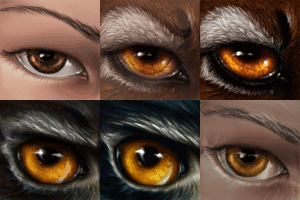
Bust commission for Rahne.
Rahne © himself.
~2-3 hours Adobe Photoshop CS3.
Rahne © himself.
~2-3 hours Adobe Photoshop CS3.
Category Artwork (Digital) / Portraits
Species Wolf
Size 500 x 500px
File Size 208.9 kB




*chuckles* I'm quite fond of blue myself. And yes, as I understand, he was really happy with his portrait :3
There is a rather large (although perhaps subtle at first glance) difference between the Elements series and the CS series. The BIG difference is that CS is much, much more powerful (along with older versions, such as PS6 and PS7, which are also superior to elements). Basically, CS is designed for professionals, and Elements is designed for your average untrained consumer. You have a lot more power and control, and I don't actually have Elements, so it's hard for me to specifically say what the difference is.
However, I did own an older kind of version of Elements, which was called something else. Adobe PhotoDeluxe 2.0 I believe. Anyway... The difference was that its actual painting tools did not have as much control and customizability as actual PS does, and much of PD's functions are automated or tutorial-led, meaning it does it for you. On the other hand, more advanced PS versions are more complicated and allow the user to tweak everything by hand, manually, just the way they want it. This is unnecessary for the casual photo-editter at home, so it's omitted in the much cheaper Elements products.
I'd suggest finding a friend who owns PS, and just trying it out to see the difference.
There is a rather large (although perhaps subtle at first glance) difference between the Elements series and the CS series. The BIG difference is that CS is much, much more powerful (along with older versions, such as PS6 and PS7, which are also superior to elements). Basically, CS is designed for professionals, and Elements is designed for your average untrained consumer. You have a lot more power and control, and I don't actually have Elements, so it's hard for me to specifically say what the difference is.
However, I did own an older kind of version of Elements, which was called something else. Adobe PhotoDeluxe 2.0 I believe. Anyway... The difference was that its actual painting tools did not have as much control and customizability as actual PS does, and much of PD's functions are automated or tutorial-led, meaning it does it for you. On the other hand, more advanced PS versions are more complicated and allow the user to tweak everything by hand, manually, just the way they want it. This is unnecessary for the casual photo-editter at home, so it's omitted in the much cheaper Elements products.
I'd suggest finding a friend who owns PS, and just trying it out to see the difference.
That's what I thought. I know no one who has PS CS. Maybe I should download a trial version like I did for PS 6.
(back then I didn't know what I was doing, but with Elements I do. Maybe...)
I wondered if Creative Suite series was made more for ARTISTS rather than casual users who just wanna tweak a photo (I'm about in that demographic). So I think you confirmed it. I'm probably not ready for CS. I tried Illustrator twice (vector) and I couldn't do a thing with it. I'm a pixel artist, so naturally....I didn't "get it".
Maybe I'll stick with Painter X. I don't think I have enough room in the Puter for all four programs if I did download CS. My harddrive LABORS just to use Painter. :( And I got 445 G on this thing....3/4 empty.
(back then I didn't know what I was doing, but with Elements I do. Maybe...)
I wondered if Creative Suite series was made more for ARTISTS rather than casual users who just wanna tweak a photo (I'm about in that demographic). So I think you confirmed it. I'm probably not ready for CS. I tried Illustrator twice (vector) and I couldn't do a thing with it. I'm a pixel artist, so naturally....I didn't "get it".
Maybe I'll stick with Painter X. I don't think I have enough room in the Puter for all four programs if I did download CS. My harddrive LABORS just to use Painter. :( And I got 445 G on this thing....3/4 empty.
After PDeluxe, I started off with PS6, was flummoxed, but stuck with it, and every time a new version comes out, I can hardly notice.
Yes, CS is made for professional artists, designers, and other people working on professional photo editting, video/movie editting, etc. A possible alternative to Photoshop CS with more of an intuitive feel (although I haven't played with it long enough to get the hang of it) is Painter. Tis true it eats up ram like nothing else, though :c
Illustrator is ideal for super-clean lineart (it's what I use, and why my lineart stuff is comparable in price to my painted stuff), logos, hard-cellshading, etc. You really do have to think "outside the box," but the easiest way to break yourself into it is to use the brush or pencil tool. Practice tracing over your existing work. Refine the lines by using the white arrow and some of the additional pen tools - pentool+ (add point), pentool- (remove point), etc.
The black arrow selects an entire "unit" - an entire chunk, or an entire curve, depending on whether it's just a line, or just a filled shape.
The white arrow is your friend, although you won't know it at first. After drawing your line, click it (sometimes shift-clicking will help you select the specific parts of your line you want), and these funky points and tangent lines will show up. These are what define your line. By making the handles longer, you make your curve more extreme in that direction at that point, and by making the handles shorter, you make the curve less extreme at that point. These points exist to describe anything "non straight" in your line - you can add or remove them as needed to get your curve just right. You can also use the white arrow to click and drag these points to where you want them.
It sounds painful and complicated, but with a little practice with the pencil/brush tool + white arrow + pen tools, you'll have all you need to do fantastic lineart and crispy clean logo work.
Yes, CS is made for professional artists, designers, and other people working on professional photo editting, video/movie editting, etc. A possible alternative to Photoshop CS with more of an intuitive feel (although I haven't played with it long enough to get the hang of it) is Painter. Tis true it eats up ram like nothing else, though :c
Illustrator is ideal for super-clean lineart (it's what I use, and why my lineart stuff is comparable in price to my painted stuff), logos, hard-cellshading, etc. You really do have to think "outside the box," but the easiest way to break yourself into it is to use the brush or pencil tool. Practice tracing over your existing work. Refine the lines by using the white arrow and some of the additional pen tools - pentool+ (add point), pentool- (remove point), etc.
The black arrow selects an entire "unit" - an entire chunk, or an entire curve, depending on whether it's just a line, or just a filled shape.
The white arrow is your friend, although you won't know it at first. After drawing your line, click it (sometimes shift-clicking will help you select the specific parts of your line you want), and these funky points and tangent lines will show up. These are what define your line. By making the handles longer, you make your curve more extreme in that direction at that point, and by making the handles shorter, you make the curve less extreme at that point. These points exist to describe anything "non straight" in your line - you can add or remove them as needed to get your curve just right. You can also use the white arrow to click and drag these points to where you want them.
It sounds painful and complicated, but with a little practice with the pencil/brush tool + white arrow + pen tools, you'll have all you need to do fantastic lineart and crispy clean logo work.
I tried just drawing with Illustrator but it was all tracking and levers. That stuff. :( I couldn't draw anything. I never noticed the white arrow. I set myself up for disappointment when I expected I could just draw like on Painter. (Actually that's what I really wanted. Someday though....maybe I'll try CS3 again. When I retire and have the time.
Thanks for all the info. They really don't come with instructions, and I'm marginally dim depending on what I'm confronted with. 3/4's of the time it's me to blame. :|
Thanks for all the info. They really don't come with instructions, and I'm marginally dim depending on what I'm confronted with. 3/4's of the time it's me to blame. :|

Comments