
 FA+
FA+ Shop
Shop
1529
Views
Views
19
Favorites
Favorites
Category
All / All
Species Unspecified / Any
Size 1280 x 770
File Size 136.5 kB
Report this content
More from Redwolfxlll


Well time to remove and keep hard drive and get new laptop <xD
man it been long time I draw on paper >▼<
man it been long time I draw on paper >▼<
Category All / All
Species Unspecified / Any
Size 1280 x 770px
File Size 136.5 kB



It could still be a virus of some sort. While most viruses get to work right away, some will wait for a specified time, event, user action, etc. Not only that, but some viruses are designed to infect USB sticks and spread that way.
Simply put, if you have EVER connected that laptop to the Internet, plugged in a USB stick, or ran a CD on it, it could have been infected long ago without you even knowing. Emphasis on "ever"; it wouldn't have to have been recently. (though it is typically something that reveals itself pretty quickly if it plans on ever doing so)
I know I'm just some guy on the Internet as far as you're concerned, but for what it's worth, I'm a Software Developer with 15+ years of experience, and as such know a lot about computers. No "real" error screen would ever look that ridiculous. The only time you see comically oversized big red all caps "ERROR" screens is when someone's making a joke, or someone just wants to fuck with you and is hoping you'll be scared/tricked into think "letters that big MUST be serious."
Simply put, if you have EVER connected that laptop to the Internet, plugged in a USB stick, or ran a CD on it, it could have been infected long ago without you even knowing. Emphasis on "ever"; it wouldn't have to have been recently. (though it is typically something that reveals itself pretty quickly if it plans on ever doing so)
I know I'm just some guy on the Internet as far as you're concerned, but for what it's worth, I'm a Software Developer with 15+ years of experience, and as such know a lot about computers. No "real" error screen would ever look that ridiculous. The only time you see comically oversized big red all caps "ERROR" screens is when someone's making a joke, or someone just wants to fuck with you and is hoping you'll be scared/tricked into think "letters that big MUST be serious."








If you have your factory OS disk, pop it in and make sure to use boot selection forcing the CD. You should be able to launch a system restore from there.
The others are right on questioning this because in the worst case it should just be a black prompt screen with no input, or under standard conditions a BSOD/Error message with details.
The others are right on questioning this because in the worst case it should just be a black prompt screen with no input, or under standard conditions a BSOD/Error message with details.



1. I don't think that is a real message I think you have a serious Malware or Hack that has occurred. With that being said I highly recommend you take your PC to someone to look at and check not just the PC but also the Hard-Drive to check if there is something in there that is doing this. Because it can move through out the PC and store its self in the Hard-Drive if it is a Hacking Virus or a Powerful Malware.
2. Your paper drawings are absolutely adorable~
2. Your paper drawings are absolutely adorable~





I don't think it's actually broken. For one thing error messages are never that big and will tell you the details of the problem.
But I would still recommend a new laptop anyway. If you want to play PC games you'll want Windows since Macs are very picky about what software you can install; I recommend Windows 7.
You'll want to look online to find a laptop powerful enough to suit your needs but cheap enough to stay in your budget range. Try looking for custom laptops. I go to a store called Microcenter that builds computers for you and had them put in the best hardware available at the time. It didn't cost me much either since they just kinda threw a bunch of good hardware into a heavyass tower.
Now I don't know if you have a Microcenter or something similar in your area but if you look on Google you can find a customizing service. Just don't go for the flashy shit like Alienware they'll intentionally throw in crap you don't need just to drive the price up.
But most important of all is that regardless of what kind of PC you want to get you must get an antivirus. I can't help you pick one since it's really about what you're comfortable with, I just recommend you don't get McAfee, it's garbage.
But I would still recommend a new laptop anyway. If you want to play PC games you'll want Windows since Macs are very picky about what software you can install; I recommend Windows 7.
You'll want to look online to find a laptop powerful enough to suit your needs but cheap enough to stay in your budget range. Try looking for custom laptops. I go to a store called Microcenter that builds computers for you and had them put in the best hardware available at the time. It didn't cost me much either since they just kinda threw a bunch of good hardware into a heavyass tower.
Now I don't know if you have a Microcenter or something similar in your area but if you look on Google you can find a customizing service. Just don't go for the flashy shit like Alienware they'll intentionally throw in crap you don't need just to drive the price up.
But most important of all is that regardless of what kind of PC you want to get you must get an antivirus. I can't help you pick one since it's really about what you're comfortable with, I just recommend you don't get McAfee, it's garbage.











I have never seen an error like that before.
To me, it looks like it's on, and running just fine. My recomendation would be to wipe the drive and reinstall windows. or use whatever restore options are available. but then you'd lose any work on it that isn't properly backed up.
If you planned to remove the drive and use it as a database to restore data on another computer, I would highler recomend you do not, having the whole drive visible to another computer just encourages whatever "fake error" malware that is to spread to the new computer.
To me, it looks like it's on, and running just fine. My recomendation would be to wipe the drive and reinstall windows. or use whatever restore options are available. but then you'd lose any work on it that isn't properly backed up.
If you planned to remove the drive and use it as a database to restore data on another computer, I would highler recomend you do not, having the whole drive visible to another computer just encourages whatever "fake error" malware that is to spread to the new computer.

Press Ctrl + Shift + Esc and see if you get a response.
If you do, find the rogue process and kill it! Then locate it using the tools listed below and purge it!
If no response, power off (not a reboot, hold power button until screen goes black), remove battery, wait 1 minute. This will allow RAM to clear and any components discharge.
Power up, and assuming you are running Windows XP, Vista or 7, mash the "F8" key on your keyboard after the BIOS logo and BEFORE the Windows Logo. If done correctly you will be presented with the option to boot into Safe Mode. Select that and boot into "Safe Mode" none of the other options.
Wait for Windows to load into Safe Mode and then log in as normal, the graphics will be messed up, this is because no drivers have been loaded so it's running in "Basic VGA Mode", this is normal.
Start "System Restore" and select the last known day your system was working and roll back to it.
PERSONAL DATA WILL NOT BE AFFECTED only software.
bobingabout is right, if this is malware, connecting that drive to any other Windows based computer will potentially infect it as well. Download "Linux Mint" and "burn" it to a DVD or write it to a USB stick using the application "Rufus" (All recommended software linked below)
If you can get the system back up, get a USB stick and put it in another computer, download the "Malware Bytes Anti-Malware" installer to it and then install it on the laptop. Opt out of the Trial on install then run a FULL SCAN.
Whilst that is running, remove the USB stick and insert it into a computer that is NOT BOOTED INTO WINDOWS (for instance booted into the Linux Mint instance) and then ERASE the USB stick using "Disk Utility" (Mac OS) or "GParted" (Linux/Mint). This will prevent infection if you use the USB stick again in the future.
Once MBAM has completed a scan you will have a rough idea where you stand.
That "ERROR" message you see is -fake- some kind of scareware/malware either designed to ruin your day, slow you down or just prank you is running in the background, the above should help you.
==== Links ====
MBAM: https://downloads.malwarebytes.org/...../mbam_current/
RUFUS: https://rufus.akeo.ie/downloads/rufus-2.5.exe
Linux Mint: http://www.linuxmint.com/edition.php?id=191 [Pick a Mirror Closest to you] 1.5GB ISO Image
Best of luck!
Miles~
If you do, find the rogue process and kill it! Then locate it using the tools listed below and purge it!
If no response, power off (not a reboot, hold power button until screen goes black), remove battery, wait 1 minute. This will allow RAM to clear and any components discharge.
Power up, and assuming you are running Windows XP, Vista or 7, mash the "F8" key on your keyboard after the BIOS logo and BEFORE the Windows Logo. If done correctly you will be presented with the option to boot into Safe Mode. Select that and boot into "Safe Mode" none of the other options.
Wait for Windows to load into Safe Mode and then log in as normal, the graphics will be messed up, this is because no drivers have been loaded so it's running in "Basic VGA Mode", this is normal.
Start "System Restore" and select the last known day your system was working and roll back to it.
PERSONAL DATA WILL NOT BE AFFECTED only software.
bobingabout is right, if this is malware, connecting that drive to any other Windows based computer will potentially infect it as well. Download "Linux Mint" and "burn" it to a DVD or write it to a USB stick using the application "Rufus" (All recommended software linked below)
If you can get the system back up, get a USB stick and put it in another computer, download the "Malware Bytes Anti-Malware" installer to it and then install it on the laptop. Opt out of the Trial on install then run a FULL SCAN.
Whilst that is running, remove the USB stick and insert it into a computer that is NOT BOOTED INTO WINDOWS (for instance booted into the Linux Mint instance) and then ERASE the USB stick using "Disk Utility" (Mac OS) or "GParted" (Linux/Mint). This will prevent infection if you use the USB stick again in the future.
Once MBAM has completed a scan you will have a rough idea where you stand.
That "ERROR" message you see is -fake- some kind of scareware/malware either designed to ruin your day, slow you down or just prank you is running in the background, the above should help you.
==== Links ====
MBAM: https://downloads.malwarebytes.org/...../mbam_current/
RUFUS: https://rufus.akeo.ie/downloads/rufus-2.5.exe
Linux Mint: http://www.linuxmint.com/edition.php?id=191 [Pick a Mirror Closest to you] 1.5GB ISO Image
Best of luck!
Miles~
This is Red's cousin
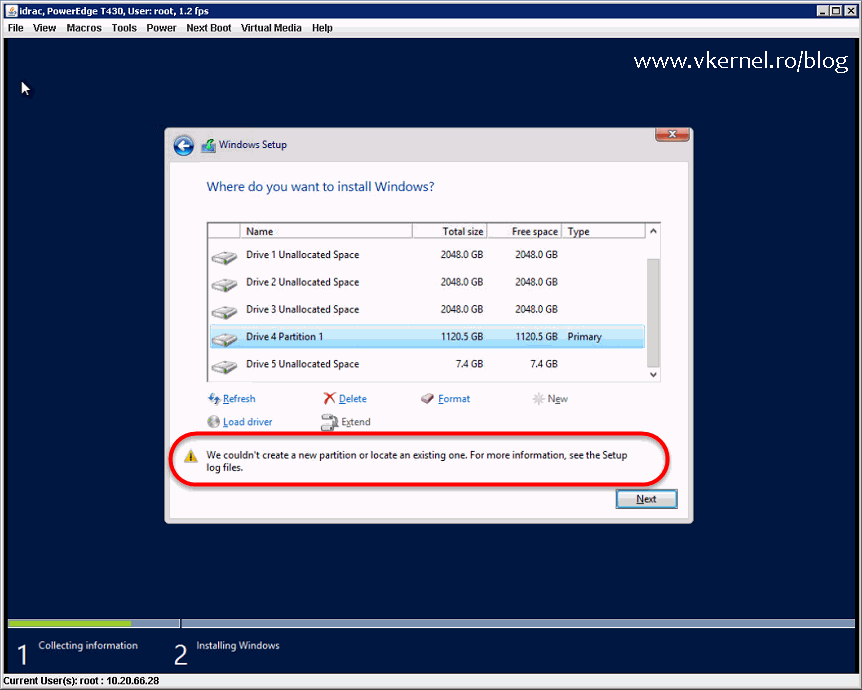
We some how manage to go to the boot menu, but after we tried everything but we wipe out all the files inside the HDD. We also tried to install a new Windows 8.1 but it keep telling us something like this
http://www.vkernel.ro/blog/wp-conte.....Install-01.png
We some how manage to go to the boot menu, but after we tried everything but we wipe out all the files inside the HDD. We also tried to install a new Windows 8.1 but it keep telling us something like this
http://www.vkernel.ro/blog/wp-conte.....Install-01.png
Sounds like the hard-drive has failed I am sorry to say.
Try running Linux mint off a USB stick or bootable CD and see if you can see the hard disk in "Gparted"
If not, check that the data and power leads inside the PC are snug (or, if it's a laptop, slide the drive out and then re-seat it to ensure all contacts are being made)
Try running Linux mint off a USB stick or bootable CD and see if you can see the hard disk in "Gparted"
If not, check that the data and power leads inside the PC are snug (or, if it's a laptop, slide the drive out and then re-seat it to ensure all contacts are being made)

Comments